By TemaLab · Vertical short-video maker for Windows 10/11
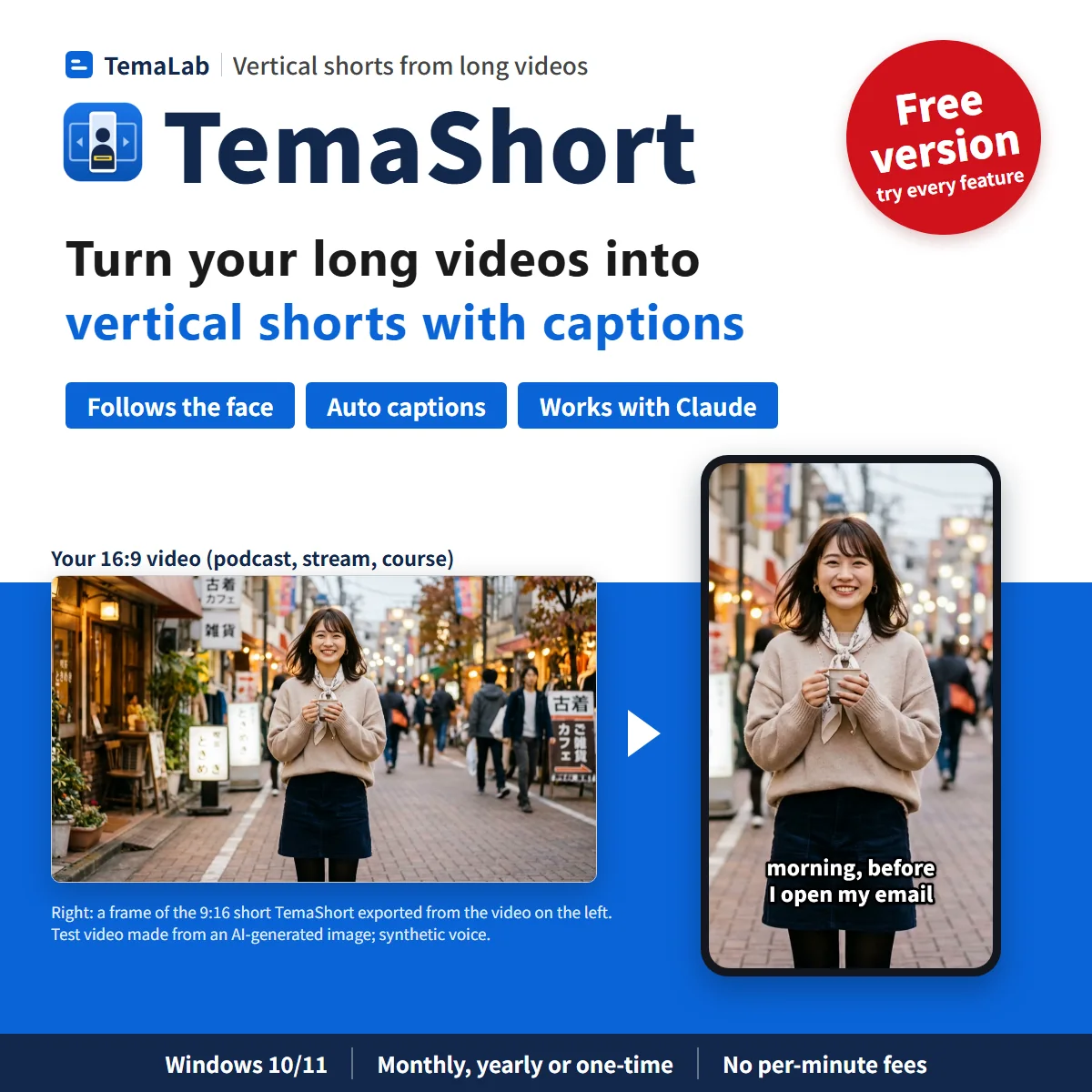
TemaShortTurn your long videos — podcasts, streams, courses, talks — into vertical shorts. The 9:16 frame follows the speaker's face, and captions are made for you.
Total (Monthly) ¥980/month(tax incl.) approx. US$6.30. Renews monthly. Cancel anytime
- You pay in Japanese yen on Stripe's secure checkout. Your card issuer converts the amount to your currency, so the final charge may differ slightly from the US$ estimate. Your license key appears right after payment and is also emailed to you.
- The full version is the same app as the free version. Just enter your license key in the free version to unlock it.
- The monthly plan renews automatically every month. You can cancel anytime from the link in your purchase email and keep using it until the end of the current period (no prorated refunds).
What the full version adds
- Ask an AI to do it. The full version can be driven from Claude Code or the Claude desktop app on your PC. Ask “Turn 0:05–0:15 and 0:30–0:40 of this episode into vertical shorts with captions” and TemaShort opens and does the work. It may also work with other AI tools that support MCP (we've tested it with Claude). Claude is not included in the price of TemaShort.
- No watermark on exported shorts
- Make as many shorts as you like for the same price. One license covers up to 2 PCs
If Windows shows a blue “Windows protected your PC” screen, click “More info” and then “Run anyway”. See how to install.
Every feature works in the free version, with no limit on the number or length of shorts. Exported shorts get a “TemaShort” watermark in the middle (the on-screen preview and .srt subtitle files don't). Making shorts from AI (Claude) or the command line is a full-version feature.
User guide (PDF)
Installation, choosing clips, framing, captions, exporting and using it from Claude, step by step.
How buying works
- Choose a plan
- Enter your cardon Stripe's page
- Get your license keyright after payment
At a glance
TemaShort is a Windows app that cuts vertical 9:16 shorts out of your own 16:9 videos — podcast episodes, live-stream recordings, online courses, talks and interviews. Mark the parts you want, and it does the reframing and captions.
- The vertical frame follows the speaker's face automatically, and you can fix it by hand
- Two people? Stack them top and bottom, or switch to whoever is speaking
- Captions from the speech in English, Japanese or Chinese. A title bar at the top, too
- Cut silences, join scenes from different videos, and export many shorts at once as 1080×1920 MP4
- Full version: tell Claude Code or the Claude desktop app the timestamps and get captioned shorts
- No per-minute or per-clip fees. The app runs in English, Japanese or Simplified Chinese
What TemaShort does
You recorded an hour-long episode, stream or lesson, and you want a few 30-to-60-second vertical clips from it. In a regular editor that means cutting each part, sliding a 9:16 frame to keep the speaker in view, and typing captions — one clip at a time. TemaShort does the reframing and captions for you. Every screenshot below is the actual app; the people are test videos made from AI-generated images, and the voices are synthetic.

The vertical frame follows the speaker's face
Play your video and press “From here (I)” and “To here (O)” to mark each part. Each part becomes one short, and you can add as many as you like. TemaShort analyzes only those parts, finds the faces, and moves the 9:16 frame with the person — by default, the one shown longest and largest.
If the frame picks the wrong person or loses a face, switch person or hold the frame from any point in the timeline, and drag the frame where you want it. Zoom can be Normal, 1.25× or 1.5×.
Profiles, dark scenes and very small faces may be missed. Cropping a 9:16 frame from a Full HD (1920×1080) video enlarges a 608×1080 area to 1080×1920, so the result is a little softer; 4K sources stay sharp.

Two people? Stack them top and bottom
Choose the layout for each short: Follow 1 (crop to one face), 2 stacked (one person on top, one below — good for interviews and co-hosted shows), or Whole frame (keep the full 16:9 picture with a blurred background above and below).

Switch to whoever is speaking
Press “Switch to the speaker automatically” and TemaShort tells the speakers apart by voice, matches each voice to a face, and adds a mark wherever the speaker changes, so the frame cuts to whoever is talking. You can change the voice-to-face matching and edit or delete any mark.
Under Trim, you can also cut silences (trim the pauses in speech) and cut the parts where the person you're following isn't visible. Every cut can be restored one by one.
Similar voices, or two people talking at once, can switch at the wrong moment. Fix those spots with the marks.

Captions made from the speech, plus a title bar
Press “Add subtitles (transcribe)” and TemaShort transcribes the speech in each short and turns it into captions. Set the spoken language to English, Japanese or Chinese (shown in Simplified Chinese), or let it detect the language. The first time, it downloads the transcription model (about 574 MB).
Edit the text and timing in the list, shift everything at once, split or join lines. Pick one of four templates and three sizes, and drag the captions up or down in the preview — “Show areas that may be covered” marks where platform buttons tend to sit. A title bar of up to two lines can go at the top. You can also export the captions as an .srt file.
We measured the captions on test recordings made with synthetic voices: an average word error rate of 2.3% across four English recordings, 0% on a two-person English meeting (both speakers correctly separated), and a 0% character error rate on one Chinese recording; automatic language detection picked the right language each time.
Those figures come from clean synthetic test audio. Real recordings — with different voices, background noise and speaking styles — will have more errors, so check the captions before you export. There's no translation feature.

Tell Claude the timestamps, get captioned vertical shorts
The full version can be driven from Claude Code or the Claude desktop app on your PC. Ask “Turn 0:05–0:15 and 0:30–0:40 of this episode into vertical shorts with captions” and TemaShort opens (even if it was closed) and does the work: it follows the speaker's face, makes the captions and exports the shorts. You can also ask for a layout (follow, stack or fit), switching to the speaker, cutting silences, or .srt files. It uses MCP, the standard way to connect AI assistants to apps.
In our development test, we asked the real Claude Code to “make captioned vertical shorts from 0:05–0:15 and 0:30–0:40”, and it exported two shorts (1080×1920, 10 seconds each) in 107 seconds. Times depend on your PC and video.
Claude can use five tools: make_shorts (make shorts from time ranges), transcribe_video (write a timestamped .srt), export_shorts (export shorts you saved in the app), inspect_video and license_status. Not sure which parts to clip? Ask Claude to “transcribe minutes 30 to 60 and suggest three parts that would make good shorts”.
While it works, a bar at the top says “AI at work”, with a Stop button, and you can watch it move through Framing, Subtitles and Export. The shorts stay in your project, so you can fine-tune the frame or captions and export again. Shorts are written to a temporary .part file and renamed at the end, so if you press Stop, nothing is left behind — not even the shorts already finished. If a file with the same name exists, it stops before starting. Your original video is never changed.
By default, TemaShort doesn't send the captions or video frames to Claude. It returns only the exported file locations, time ranges, lengths and number of caption lines. Caption text is returned only when you ask for it (return_text) — for example, when you want Claude to suggest clips. And if Claude opens an exported video or .srt file, its content is sent to Claude (an AI service). For private recordings, give Claude the timestamps yourself and don't ask it to read the content.
You set it up once. In TemaShort, choose Help > “Use from AI (register with Claude)…” to copy a one-line command for Claude Code, or the config JSON for the desktop app's Chat tab, tailored to your PC.
claude mcp add --scope user temashort -- "<install folder>\TemaShort.exe" --mcpFor scripts, the same is available from the command line (TemaShort.exe --cli or temashort.cmd make, full version).
Making shorts, transcribing and exporting from AI (Claude) or the command line is a full-version feature. With the free version, TemaShort reads nothing, doesn't even open its window, and Claude is told: “Making, transcribing and exporting shorts from AI is a full-version feature. In the TemaShort window, the free version lets you try every feature (exported shorts get a watermark).” It may also work with other AI tools that support MCP (we've tested it with Claude). Claude Code and the Claude desktop app are separate products, and Claude is not included in the price of TemaShort. See our guide How to have Claude turn a long video into vertical shorts and the “Use from AI” chapter of the user guide (PDF).
Same price however many shorts you make
Many online clip makers charge by the minute of video you upload or by credits. TemaShort doesn't: monthly, yearly or one-time, you can make as many shorts from as many hours of video as you like, and re-analyzing costs nothing.
Speed depends on your PC and video; it works without a GPU. Try the free version to see how fast it is on your PC. Internet is used only to activate your license, check for updates, and download the transcription model the first time.
More features
Join scenes
Add parts of other videos (or other parts of the same video) as scenes and join them into one short.
Autosave
Clips, framing, marks and captions are saved automatically, so you can pick up where you left off.
Original frame rate
Exports keep the source frame rate (up to 60) as H.264/AAC MP4.
English, Japanese or Chinese
The app follows your Windows display language (English, Japanese or Simplified Chinese), or choose under Settings > Display language. In English and Chinese, the free-version watermark reads “TemaShort”.
Guides
- How to turn a podcast or interview video into vertical shorts (with face tracking)
From a 16:9 episode to 9:16 clips: framing, two-person layouts, speaker switching, captions and export.
- How to have Claude turn a long video into vertical shorts
Set up TemaShort with Claude Code or the Claude desktop app, what to ask, and when the content is sent to the AI.
What you can do with the free version
Every feature works on screen in the free version. The differences are the watermark on exported shorts, and making shorts from AI.
Every feature, no limits on number or length
Face following, layouts, speaker switching, trimming, joining scenes, captions, title bar and batch export all work.
Watermark on exports
Exported shorts get a large “TemaShort” watermark in the middle. Enter a license key and it's gone.
Preview and .srt without a watermark
Check the framing and captions on your own videos in the on-screen preview, and export .srt caption files.
AI is in the full version
Making shorts from AI (Claude) or the command line is a full-version feature. The free version can still connect, check the license and inspect videos (length, size, audio).
Which videos to use
TemaShort is made for clipping videos you have the right to use.
Your own shows and recordings
Your podcast, live streams, webinars, online courses, talks and interviews. If guests appear, make sure they're happy for clips to be posted.
Videos you have permission for
Videos from a client, an employer or a creator who has given you permission to make clips — follow any conditions they set.
Not other people's videos without permission
Don't clip and publish TV shows, concerts, music videos or other people's streams without the rights holder's permission. Check the music in your videos, too.
Pricing (from ¥980/month, no per-clip fees) (tax incl.)
Prices are in Japanese yen. US$ amounts are approximate, at ¥155 = US$1 (our reference rate as of October 27, 2026); your card issuer's rate applies. Try the free version on your own videos first. Every paid plan makes unlimited shorts from videos of any length. Purchases from the EU and the UK aren’t available yet.
Free version
Monthly
Yearly
One-time
Free vs. full version: The full version removes the watermark from exported shorts. It can also be driven from Claude Code or the Claude desktop app on your PC: ask “Turn 0:05–0:15 and 0:30–0:40 of this episode into vertical shorts with captions” and TemaShort opens and does the work. The free version lets you try every feature on screen (exported shorts have a watermark); from AI, it can only connect and inspect.
It may also work with other AI tools that support MCP (we've tested it with Claude). Claude is not included in the price of TemaShort.
Monthly and yearly plans renew automatically until you cancel, and you're charged on each renewal date. You can cancel anytime from the link in your purchase email and keep using TemaShort until the end of the current period (no prorated refunds).
If TemaShort doesn't work properly on a PC that meets the system requirements within 14 days of purchase, we'll refund you in full. See our Refund Policy and Terms of Use.
System requirements
These are guidelines. Please try the free version on your own PC and videos to check speed and results.
| OS | Windows 10 / 11 (64-bit) |
|---|---|
| Memory | 8 GB or more (16 GB recommended) |
| GPU | Not required |
| Disk space | 2 GB or more (the app, about 190 MB, plus the transcription model, about 574 MB) |
| Speed | Depends on your PC and video. Try the free version to check |
| Input | MP4, MOV, MKV, WebM (horizontal videos; videos without audio can't get captions) |
| Output | Vertical 1080×1920 MP4 (H.264/AAC, original frame rate up to 60), captions (.srt) |
| Caption languages | English, Japanese and Chinese (Simplified), or detect automatically |
| App languages | English, Japanese and Simplified Chinese (follows Windows, or choose under Settings > Display language) |
| AI control (full version) | Claude Code and the Claude desktop app (MCP, sold separately), plus a command line (TemaShort.exe --cli, temashort.cmd) |
| Internet | Only to activate and check your license, check for updates, and download the transcription model once. Your videos, audio and captions are never sent |
FAQ
Questions or problems? Email [email protected] — we answer in English.
Can I buy it from the EU or the UK?
Not yet, sorry. We’re still setting up VAT registration for the EU and the UK, so purchases from those countries aren’t open. You can download and use the free version anywhere.
What kind of videos is it for?
Your own long videos: podcast episodes (video), live-stream recordings, webinars, online courses, talks and interviews. Horizontal 16:9 videos with people talking work best. Please don't clip other people's videos without the rights holder's permission.
Does it pick the best moments automatically?
TemaShort itself doesn't; you mark the parts you want. With the full version, you can ask Claude to transcribe part of your video and suggest clips, then make them — in that case the caption text is sent to Claude (an AI service).
Can I use it from Claude (AI)?
Yes, with the full version. Drive TemaShort from Claude Code or the Claude desktop app on your PC: ask “Turn 0:05–0:15 and 0:30–0:40 of this episode into vertical shorts with captions” and TemaShort opens and does the work. It uses MCP. Set it up once with the one-line command (Claude Code) or config JSON (desktop app Chat tab) copied from Help > “Use from AI (register with Claude)…”. It may also work with other AI tools that support MCP (we've tested it with Claude). Claude is not included in the price of TemaShort.
When I use it from AI, does the AI see my video?
Not by default. TemaShort returns only the exported file locations, time ranges, lengths and number of caption lines — not the captions or video frames. If you explicitly ask for the caption text (for example, to have Claude suggest clips) or for preview frames, or if Claude opens an exported video or .srt file, that content is sent to Claude (an AI service). For private recordings, give Claude the timestamps yourself and don't ask it to read the content.
Can I use it from AI with the free version?
You can connect it, check the license and inspect videos (length, size, audio). Making shorts, transcribing and exporting is a full-version feature; with the free version, TemaShort reads nothing, doesn't open its window, and Claude is told it's a full-version feature. On screen, the free version has every feature (exported shorts have a watermark).
What happens if I stop a job Claude started?
Press Stop in the bar at the top of TemaShort and it stops right away. Shorts are written to a temporary .part file and renamed at the end, so nothing is left behind, including shorts already finished. Claude is told the user stopped it.
How accurate are the captions?
On test recordings made with synthetic voices, we measured an average word error rate of 2.3% in English and a 0% character error rate in Chinese. Real recordings will have more errors depending on voices, noise and speaking style, so check the captions before exporting — you can edit the text and timing.
Are my videos uploaded anywhere?
No. TemaShort goes online only to activate and check your license, check for updates, and download the transcription model the first time. It never sends your videos, audio or captions (unless you use it from Claude and ask Claude to read the content, as described above).
Can it post to YouTube Shorts, TikTok or Instagram?
No. TemaShort exports 1080×1920 MP4 files; upload them with each platform's own app or website.
How do I install it?
Run the downloaded file (TemaShort-Setup-1.0.0.exe). If Windows shows a blue “Windows protected your PC” screen, click “More info” and then “Run anyway” — the installer isn't code-signed yet, so please make sure you downloaded it from temaheru.com. The shortcut is named “テマショート (TemaShort)” — type TemaShort in the Start menu search to find it. The app opens in English when Windows is set to English, and you can switch under Settings > Display language. The first time you add captions, it downloads the transcription model (about 574 MB).
Does it work on a Mac?
Not at the moment — Windows only.
What if I get a new PC?
Unregister the license on your old PC (Help > License…), then register it on the new one. If the old PC no longer works, email us at [email protected].
Will I get a receipt?
Yes. Stripe emails you a receipt after payment.
Why are prices in yen?
TemaLab is based in Japan, so we charge in Japanese yen. Your card issuer converts the amount to your currency; the US$ figures on this page are estimates.